



















Multilingual POS: Why Language Support Matters for Diverse Teams
Why a multilingual POS cuts mistakes and training time for diverse teams, what to check in an Arabic POS, and how two content languages work on receipts and menus.
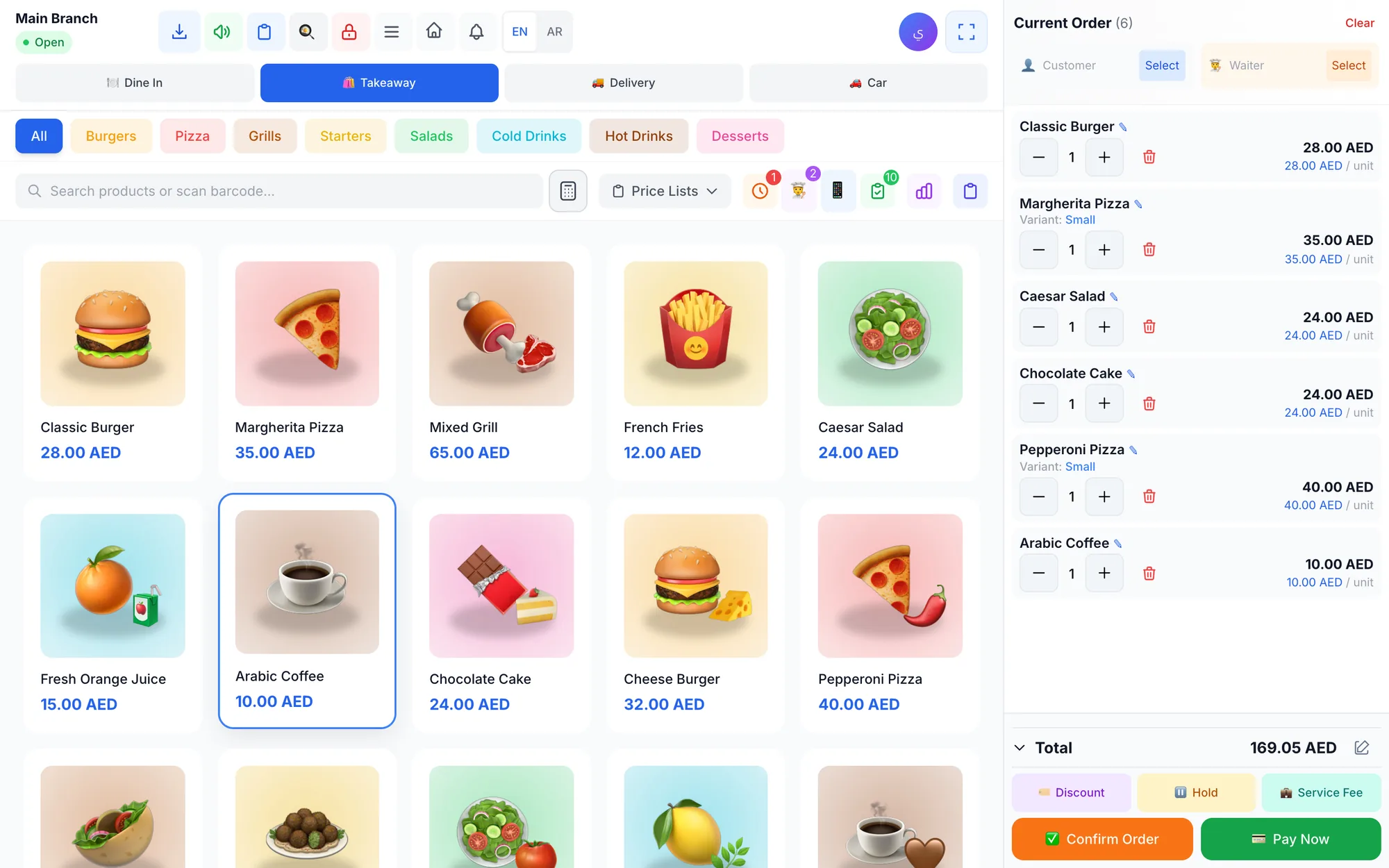
A multilingual POS lets every employee use the system in the language they understand best, while receipts, menus and product names appear in the languages your customers read. For diverse teams in the Gulf and worldwide, that means fewer mistakes at the till, faster training and receipts customers trust, such as Arabic and English on one receipt.
Picture a restaurant in Dubai on a Thursday night. The cashier is from the Philippines, two waiters speak Malayalam and Hindi, the chef reads Arabic, the owner checks reports in English, and the guests at table 7 are tourists who speak Russian. A single-language POS forces most of these people to work in their second or third language, all evening, under pressure.
That is daily reality across much of the Gulf, and increasingly in cities from London to Kuala Lumpur. This guide explains the two layers of language in a POS, why they matter for staff and customers, what to check in an Arabic POS, and how to roll out a system in several languages.
- A multilingual POS has two layers: the interface staff use, and the content customers see.
- Staff working in their own language make fewer errors and learn the system faster.
- Receipts and menus in two languages, such as Arabic and English, serve local and international customers at once.
- A real Arabic POS mirrors the whole screen from right to left, not just the text.
- Test printed receipts and kitchen tickets in every language before you go live.
What is a multilingual POS system?
A multilingual POS works in more than one language at two separate levels. Mixing them up is the most common mistake when people compare systems.
| Layer | What it covers | Who it serves | Example |
|---|---|---|---|
| Interface language | Buttons, menus, reports, messages | Staff and managers | Cashier in Filipino, owner in Arabic |
| Content languages | Product names, receipts, menus | Customers | Menu and receipt in Arabic and English |
| Text direction | Left-to-right or right-to-left layout | Readers of Arabic, Persian or Urdu | Whole screen mirrored for Arabic |
The interface language is personal: each person works in the language they are comfortable with. Content languages are a business decision: you choose which languages your products, receipts and menus appear in, usually your local language plus English.
Why language support matters for diverse teams
Language is not a cosmetic setting. It changes how fast and how accurately people work, especially at the busiest moments of the day.
- Fewer mistakes: a cashier who reads the word for refund in their own language will not confuse it with void at 9 p.m.
- Faster training: new staff learn the screen in hours instead of days when every label makes sense to them.
- Better use of features: people avoid buttons they do not understand, so discounts, held orders and split bills go unused or get misused.
- Clearer controls: permission warnings and required refund reasons only work if staff understand them.
- Confidence: staff who are not embarrassed by the screen are more willing to take responsibility at the till.
- Managers who can read reports: a branch manager who reads Arabic should not need someone to translate the daily sales report.
A laundry in Abu Dhabi with staff from three countries, for example, cannot afford a counter worker who guesses which button marks an order as ready for pickup. One wrong tap and a customer is told their suit is ready when it is still at the pressing table.
Why receipt and menu languages matter to customers
Customers see the content layer: the menu, the screen at the counter and the receipt. Getting it right quietly builds trust.
- Local customers expect their language. In the Gulf, Arabic product names on receipts and menus feel natural and professional.
- International customers need English, or their own language, to understand what they are paying for.
- Tax and legal requirements may set the language or details shown on a receipt, so check your local rules.
- QR menus are read on guests' own phones, so the menu should switch language easily.
- Messages and digital receipts land in a customer's personal chat, where a wrong or mixed language looks careless.
Two content languages cover most businesses. A bilingual Arabic and English receipt serves a Saudi family, a European tourist and your accountant at the same time.
Language in the kitchen and on the delivery route
The kitchen is where a language mistake costs the most. A guest note such as no nuts, extra spicy or sauce on the side is only useful if the cook preparing the dish can read it in seconds. If tickets print in a language the line cooks only half understand, notes get skipped and dishes come back.
- Print kitchen tickets in a content language your kitchen team reads well, and keep item names short.
- Agree on a few standard notes so cooks recognise them instantly.
- On a kitchen display, check that item names and notes are large and clear in that language.
- For delivery, make sure customer addresses and phone numbers display correctly for the driver, whatever script they were typed in.
A cloud kitchen in Riyadh with an Arabic-speaking head chef and a Bengali-speaking prep team, for example, may choose Arabic and English as content languages and train everyone on the English item names the kitchen already uses.
What to look for in an Arabic POS
Many systems claim Arabic support but only translate some labels. A proper Arabic POS passes these checks:
- Full right-to-left layout: menus, tables, forms and reports mirrored, not an English layout filled with Arabic words.
- Clean mixed text: an Arabic product name with an English brand or a model number displays in the right order.
- Arabic on paper: receipts and kitchen tickets print Arabic clearly; test your actual thermal printer, because results vary by model and settings.
- Search in both languages: a cashier can type the Arabic or the English name and find the product.
- Readable reports: Arabic reports and exports your accountant can use without reformatting.
- Customer details: Arabic names and addresses stored and printed correctly for delivery.
Run these checks with real data during your trial, ideally with an Arabic-speaking cashier who will tell you honestly whether it reads naturally. For more on the Gulf market specifically, see our guide to choosing a POS system in the UAE and the Gulf.
Multilingual POS checklist
Use this list when you compare systems or set up the one you have chosen:
- The interface covers every language your team actually speaks.
- Switching the interface language is quick and does not change product names or receipts.
- Right-to-left support is complete for Arabic, Persian and Urdu.
- You can choose two content languages for products, receipts and menus.
- Product names can be translated automatically and then corrected by hand.
- Receipts print correctly in both languages on your printer.
- Kitchen tickets print in a language the kitchen team reads.
- The QR menu and customer-facing screens switch language easily.
- The owner can read every report in their own language.
How to roll out a POS in several languages
- List the languages your staff speak and the languages your customers read.
- Choose two content languages for products, receipts and menus, usually your local language plus English.
- Import or enter products with their main name, then let automatic translation fill in the second language.
- Review the translations of your top 50 sellers by hand. Local dishes such as machboos or karak tea, brand names and sizes often need a human touch, because a literal translation can confuse guests.
- Show each person how to switch the interface to their language.
- Print test receipts and kitchen tickets in both languages and check them with a native speaker.
- Train in pairs where you can, putting a new employee with a colleague who speaks the same language.
How Quip POS handles languages
Quip POS was built as a multilingual cloud POS from the start. The whole system works in 20 languages: Arabic, English, French, Spanish, German, Italian, Portuguese, Russian, Turkish, Persian, Urdu, Hindi, Bengali, Malayalam, Chinese, Japanese, Korean, Indonesian, Malay and Filipino, with full right-to-left support.
Product names, receipts and menus use two content languages that you choose, for example Arabic and English, and names are translated automatically, so you do not type every item twice. The same content languages appear on the QR menu, which comes in more than 20 designs and lets guests order from the table and call the waiter. Our guide to QR menus and table ordering explains how it works.
Receipts and messages can also go to customers on WhatsApp from your own business number through QuipWhats, as described in our article on WhatsApp receipts. See every feature on the features page, or how it fits a busy kitchen on the restaurant and café solution page.
Next step: see your menu in two languages
The quickest way to judge language support is to see your own products on screen and on paper. Open the live demo and switch the interface to the languages your team speaks, then start a 14-day free trial with no card to import your products, choose your two content languages and print a test receipt.
Frequently asked questions
What is a multilingual POS?
Can a POS print receipts in Arabic and English?
Why does right-to-left support matter in an Arabic POS?
Can each employee use the POS in a different language?
How do I translate my menu and product names in the POS?
Which languages should a POS support in the UAE or Saudi Arabia?
Talk to the Quip POS team
Tell us about your business and we will show you the right setup, help you add your products and connect your printers.
Related articles
POS guides
Best POS System in 2026: How to Choose the Right Point of Sale
There is no single best POS system for everyone. Use these criteria, red flags and a weighted scoring checklist to find the point of sale software that fits your business.
 POS guides
What Is a POS System? A Complete Guide for Business Owners
A plain-language guide to POS systems: the hardware and software, what happens at checkout, how stock and reports work, cloud vs local, and who needs one.
 POS guides
POS System in the UAE and Gulf: How to Choose the Right One
What businesses in Dubai, Abu Dhabi, Riyadh and Doha need from a POS system: bilingual receipts, staff languages, tax reports, AED pricing, WhatsApp and local support.