


















Café and Coffee Shop POS: Faster Counter Service, Lower Costs
How to choose and set up a coffee shop POS for speed at the counter, with sizes and extras, peak-hour tactics, cost per cup and loyalty points for regulars.
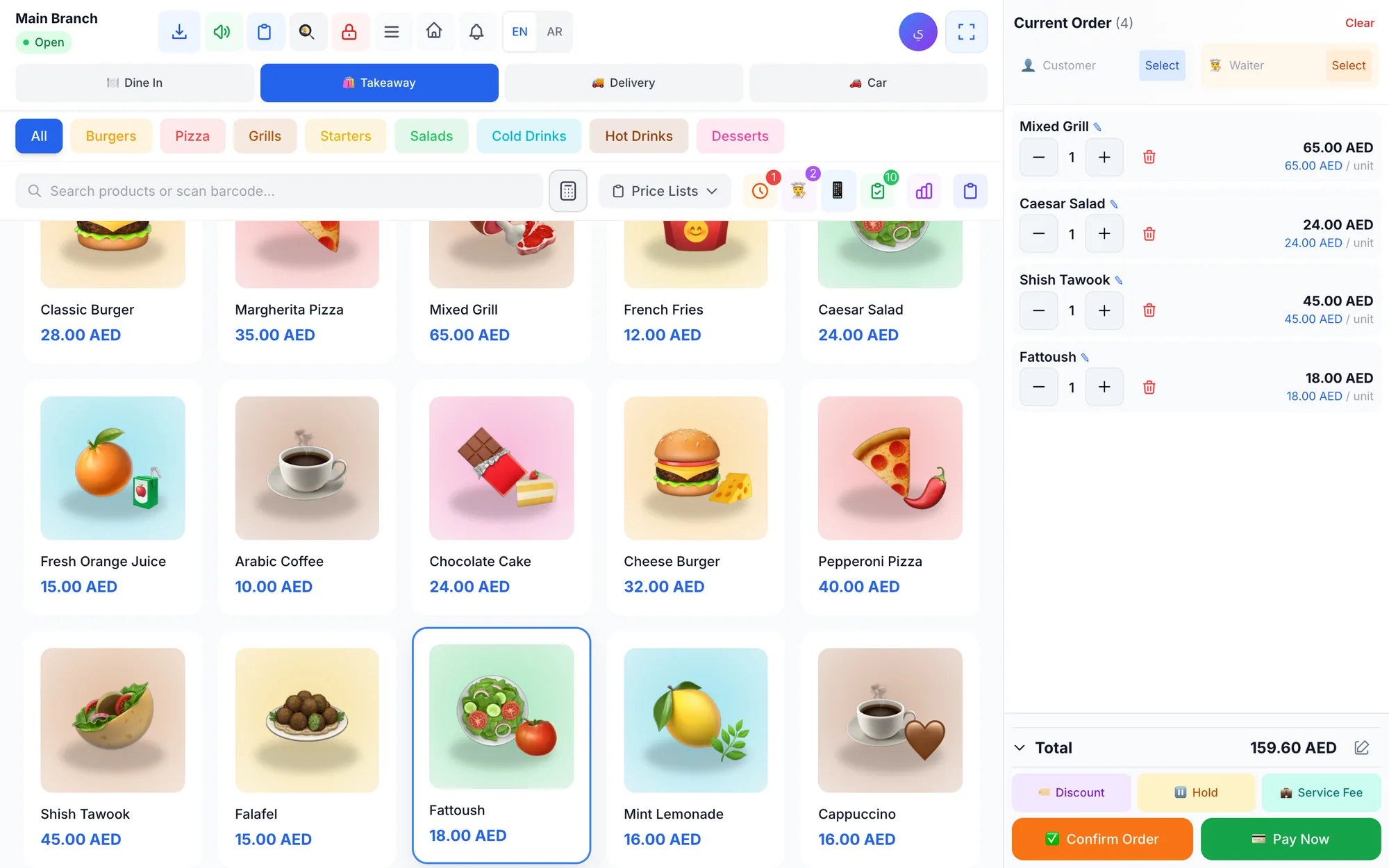
A café POS is a point of sale built for speed at the counter: drinks in one or two taps, sizes and customisations without typing, mixed payments, and a bar screen or printer that sends the order to the barista instantly. A good coffee shop POS tracks beans, milk and cups through recipes and rewards regulars with loyalty points.
In a coffee shop, seconds are the business. The morning queue in a Dubai office district or a university café in Riyadh can decide the day's sales between 7 and 10 am, and every slow transaction is a customer who walks to the next counter. Tickets are small, so volume and repeat visits pay the rent.
This guide explains how to set up your menu for speed, handle sizes and milk options, get through peak hours, control the cost of every cup and build loyalty with your regulars. It ends with a checklist to test any café POS before you commit.
- Put your best-selling drinks on the first screen; most orders should take two or three taps.
- Treat sizes and milk options as part of the drink, with their own prices, not as free-text notes.
- Use a second device to take orders in the queue during the morning rush.
- Cost each drink by recipe; milk and cups can cost nearly as much as the coffee.
- Loyalty points give regulars a reason to choose you over the café next door.
What makes a coffee shop POS different from a restaurant POS?
A restaurant POS is built around tables, courses and long bills. A café runs on a different rhythm:
- High volume, small tickets: hundreds of short transactions a day instead of dozens of long ones.
- Customisation on almost every order: size, milk, extra shot, sugar level, iced or hot.
- Mostly takeaway: many guests never sit down, and some never leave the car.
- Regulars: the same customers return several times a week, which makes loyalty unusually valuable.
- Two production lines: the bar makes drinks while the kitchen or display case handles food.
That means the POS screen, the payment flow and the bar's order queue matter more than table maps. Many cafés still have a few tables, so you want both in one system. If you also run a full kitchen, our checklist of the best POS for restaurants and cafés covers the rest.
How to set up a café menu for a fast counter
- Group by how people order, not by how you buy: hot coffee, iced coffee, tea, fresh juice, bakery, food.
- Colour-code categories so a new cashier finds iced drinks by colour before reading a label.
- Put best sellers first. A small group of drinks usually makes up a large share of orders; they belong on the first screen.
- Use item photos for pastries and seasonal drinks; they help new staff and guests who point at the display.
- Keep names short and consistent: "Spanish Latte", not "Our Famous Signature Spanish-Style Latte".
- Use search and barcodes for packaged items such as bottled water, retail coffee bags and snacks.
- Test it at speed: time a cashier ringing up "a large iced latte with oat milk and a croissant". If it takes more than a few seconds, simplify.
How should a café POS handle sizes, milk and extras?
Customisation is where cafés lose both speed and money. If extras are typed as notes, they are never charged and never deducted from stock.
Sizes
Each size should have its own price, set once in the system. The cashier taps "Latte", then "Large", and the price is right every time. Because a large drink uses more milk and sometimes an extra shot, each size should also be costed separately.
Milk options and paid extras
Oat, almond or lactose-free milk, an extra shot or a flavour syrup costs you money, so price it consistently. Decide which extras are free and which are charged, write it down, and make sure every cashier applies the same rule. A paid extra that is forgotten five times a day adds up over a month.
Notes to the barista
Some requests are free and only need to reach the bar: "extra hot", "half sugar", "name on cup: Sara". These belong in notes that appear on the bar screen or the printed ticket, so the barista sees them without asking.
How to handle the morning rush and peak hours
Peak hour is where a café POS proves itself. Plan for it before it happens.
Line-busting with a phone or tablet
When the queue reaches the door, send a second team member down the line with a phone or tablet to take orders. The orders go straight to the bar, so drinks are already being made when guests reach the counter to pay or collect.
Drive-up orders
In the Gulf, many guests prefer to stay in the car. Record drive-up orders with the car's plate number so the runner knows which car to go to, and keep them in the same queue as counter orders so the bar works in true order.
Payments that don't slow the line
- Accept split and mixed payments, such as part cash and part card, without voiding and re-ringing the order.
- Show the change due on screen so cashiers never calculate in their heads.
- Open each shift with a counted float and close it with a cash count, so busy mornings still balance.
A bar screen instead of shouting
A screen on the bar showing new, preparing and ready orders, with a timer on each, keeps baristas in sequence. A sound alert for new orders helps over the noise of the grinder and the steam wand.
How to control the cost of coffee beans, milk and cups
Coffee is a high-margin product, but only if you know the cost of every cup. Here is a medium latte costed by recipe and sold at AED 18:
| Ingredient | Quantity | Purchase price | Cost per cup |
|---|---|---|---|
| Espresso beans | 18 g | AED 120 / kg | AED 2.16 |
| Fresh milk | 220 ml | AED 6 / litre | AED 1.32 |
| Cup, lid and sleeve | 1 set | AED 0.60 / set | AED 0.60 |
| Sugar and stirrer | 1 set | AED 0.10 / set | AED 0.10 |
| Cost per cup | AED 4.18 |
That is a food cost of about 23%. Notice where the money goes: milk and packaging together cost nearly as much as the coffee. Switch the guest to oat milk at AED 14 per litre and the milk alone becomes AED 3.08; if you do not charge for it, the cost of that cup rises by more than 40%.
Linking each drink to its recipe means every sale deducts beans, milk and cups from stock automatically. The hidden losses then show up in the gap between system stock and the shelf:
- Shots poured while calibrating the grinder each morning.
- Milk steamed and poured away.
- Remade drinks and staff drinks that are never recorded.
- Pastries that expire in the display case.
Record each of these as a stock adjustment with a reason. Our guide to recipe costing and food cost control walks through the full method.
Loyalty points: how to keep your regulars coming back
A café's best customers visit several times a week, which makes a simple points program worth more here than in most businesses. Keep it easy:
- Points on every purchase, linked to the customer's phone number, so nobody needs to carry a card.
- Redeem as a discount once a threshold is reached, for example the value of a free medium drink.
- Tiers for your most loyal guests, with a small extra benefit at each level.
- Promo codes, percentage or fixed, for a new seasonal drink or a quiet afternoon.
For design ideas and the maths behind rewards, read our customer loyalty program guide.
Café POS checklist: what to test before you choose
| What to test | Why it matters | How to test it |
|---|---|---|
| Order speed | The queue is your revenue | Ring up your five most common orders against a timer |
| Sizes and extras | Uncharged extras leak money | Add oat milk and an extra shot, then check price and stock |
| Bar screen or printer | Drinks must start at once | Send ten orders in a row and watch the queue |
| Offline selling | Mornings cannot stop | Disconnect the internet and keep selling |
| Recipes and stock | Beans and milk are major costs | Sell five lattes and check that stock moved |
| Loyalty | Regulars drive repeat sales | Add a customer, earn points, redeem them |
| Shift close | Busy days still need to balance | Open a shift, sell, close with a cash count |
How Quip POS works for cafés and coffee shops
Quip POS is built for touch screens and tablets, with colour-coded categories, search, barcode scanning and item photos, so the counter stays fast during the rush. Here is how it covers the needs above:
- Variants such as sizes, each with its own price, and guest notes that appear on the kitchen display.
- Takeaway, dine-in, delivery and drive-up orders, with the car's plate number recorded for drive-up.
- A kitchen display on any screen with a browser, showing new, preparing and ready orders with timers and sound alerts; or route items to separate printers for the bar and the kitchen.
- The waiter app on phones, so a second team member can take orders in the queue or at tables and send them to the bar and the cashier.
- Recipes that link each item to its ingredients, deduct stock automatically and show each item's cost and margin, with low-stock alerts before beans or milk run out.
- Loyalty points on every purchase, redeemable as discounts, with tiers and reports, plus percentage or fixed promo codes.
- Split and mixed payments with change due, and shifts closed with a cash count and an over/short report.
- Offline selling in the Windows and Mac desktop app, which keeps selling and printing when the internet drops and syncs orders when it returns.
The restaurants and cafés solution page shows the full setup, and the desktop and mobile apps are on the download page.
Make your counter faster this week
Time your five most common orders on your current system. If any of them takes more than a few taps, that is where your queue comes from. Then see how the same orders feel in Quip POS: open the live restaurant demo in your browser, or start a 14-day free trial with no card and set up your own menu, sizes and recipes.
Frequently asked questions
What is the best POS for a coffee shop?
Can I run a café POS on an iPad or tablet?
How do I track coffee bean and milk inventory?
How much does a café POS cost?
Can a café POS work without internet?
How can I speed up service in my coffee shop?
Talk to the Quip POS team
Tell us about your business and we will show you the right setup, help you add your products and connect your printers.
Related articles
Restaurants & cafés
Opening a Restaurant: Technology and Operations Checklist
Before you open a restaurant, make sure your menu, printers, kitchen screens, staff roles and payment methods are ready. This checklist helps you test service before day one.
 Restaurants & cafés
POS for Bakeries and Sweet Shops: A Practical Guide
A bakery POS should speed up the counter, manage variants, track recipe cost, hold pre-orders until pickup and record wastage. Here’s what to look for.
Restaurants & cafés
Table Management for Restaurants: Map, Move, Merge and Split Bills
Learn how to organise restaurant tables with zones, move and merge parties smoothly, and split the bill without slowing service. Practical tips for faster turnover and fewer mistakes.