




















Salon POS System: Appointments, Services and Staff Commissions
What a salon POS system should do: appointments per stylist, services and products on one bill, staff on every sale, automatic commissions and a staff portal with PIN.
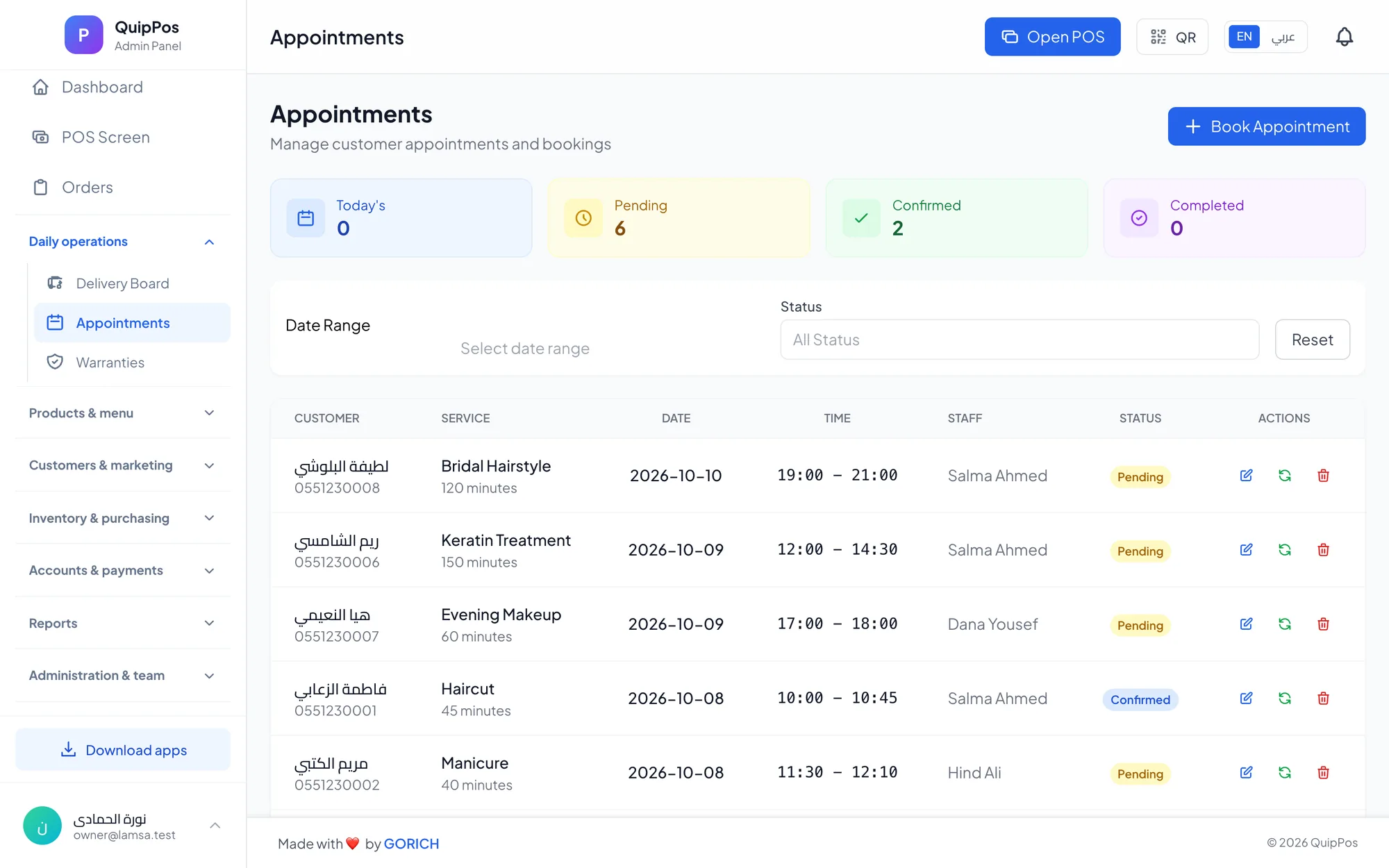
A salon POS system brings appointments, checkout and staff management into one place. It books each client with the right stylist and service, sells services and retail products on the same bill, records who performed every service and calculates commissions automatically, replacing the paper diary, the calculator and the end-of-month commission debate.
Think of a beauty centre in Doha on a Thursday afternoon before a wedding weekend. Three stylists and a nail technician are fully booked, a bride's sister walks in asking for a blow-dry, and one client has colour, a treatment and buys two bottles of shampoo. At the end of the day, who earned what, and was every service actually charged?
Salons, spas, nail studios and beauty centres all share this mix of time-based bookings, people-based earnings and product sales. This guide explains what a salon POS system should do, how to set up commissions fairly, and how to choose software that your team will actually use.
- Book appointments per staff member and per service, and reschedule without losing track.
- At checkout, select who performed each service so sales and commissions are credited correctly.
- Set commissions per service as a percentage or a fixed amount, with a report per staff member.
- Give staff a portal with PIN sign-in to see their own appointments and commissions.
- Sell retail products on the same bill and reward regulars with loyalty points.
What does a salon POS system do?
A salon POS is more than a cash drawer. It connects the three things that decide whether a salon is profitable: how full the chairs are, how much each visit is worth, and what each team member earns. A good system handles these jobs every day:
- Appointments: book clients by staff member and service, move them when plans change, and see the day at a glance.
- Checkout: charge services and products together, with split payments, discounts and promo codes.
- Staff attribution: record which stylist or therapist performed each service on the bill.
- Commissions: calculate earnings per service automatically and report them per person.
- Products and stock: track shampoos, serums, nail polish and other retail items.
- Clients: keep purchase history and loyalty points so regulars feel known.
- Control: shifts with cash counts, refunds with reasons and a log of sensitive actions.
How should a salon manage appointments and walk-ins?
The appointment book is the heartbeat of a salon. When it lives on paper or in a group chat, double bookings, forgotten clients and idle chairs follow.
Book by staff member and service
Every appointment should be linked to a specific person and a specific service, such as a cut and blow-dry with Sara or a gel manicure with Maria. This lets the receptionist see each staff member's day and lets each stylist know exactly what is coming next.
Reschedule without losing the client
Clients change plans. Moving an appointment in the system, rather than crossing out and rewriting, keeps the record clean and shows who has a free slot. Call or message the client to confirm the new time so nobody turns up at the wrong hour.
Fit in walk-ins
Walk-ins are valuable, especially for quick services such as blow-dries, threading and nail touch-ups. When a walk-in arrives, add the visit to the schedule of the staff member who is free, so the day's view stays accurate and the service is credited at checkout.
A simple habit helps: at the start of each day, the manager reviews the appointment list per staff member and spots gaps that could be offered to walk-ins or regular clients. Barbershops, where walk-ins are often the majority, have their own rhythm, covered in our barbershop POS guide.
How does checkout work in a salon POS?
Salon bills often mix several services, several staff members and retail products. The checkout screen has to make that fast, because the client is standing at the desk with wet nails or a fresh blow-dry.
- Add the services performed, from colour-coded categories on a touch screen or tablet.
- Select who performed each service. One bill can credit a colourist for the colour and an assistant for the treatment.
- Add retail products by scanning a barcode or searching by name.
- Apply a discount or promo code if one applies, within the limit your branch allows.
- Take payment in cash, card or bank transfer, or a mix of them on one bill, with the change due calculated.
- Send or print the receipt, with your logo, on paper or on WhatsApp.
If a client pays part now and the rest later, the unpaid balance should stay visible until it is collected, rather than living in someone's memory.
How to set up salon staff commissions
Commissions are where trust between owner and team is won or lost. The best setups are simple, written down and calculated by the system, not by hand at the end of the month.
Percentage or fixed amount?
A percentage commission rewards higher-value services and grows with your prices. A fixed commission is easier to understand for quick, standard services. Many salons use both: a percentage on colour and bridal work, a fixed amount on manicures and blow-dries.
| Service (example) | Price | Commission rule | Staff earns |
|---|---|---|---|
| Haircut and blow-dry | AED 150 | 20% | AED 30 |
| Full hair colour | AED 400 | 15% | AED 60 |
| Gel manicure | AED 90 | Fixed AED 15 | AED 15 |
| Bridal makeup | AED 1,000 | 10% | AED 100 |
The prices and rates above are only examples; set your own based on your market and margins.
Rules that prevent disputes
- Set the commission on each service, not per person, so the same work earns the same rate.
- Always select the staff member at checkout; an unassigned service earns nobody a commission and distorts reports.
- Decide in writing how refunds affect commissions, and require a reason for every refund.
- Share the commission report with each person every week or month, not only on payday.
Why a staff portal with PIN sign-in matters
Most commission arguments come from a lack of visibility. When stylists cannot see their own numbers, they keep private notebooks, and the two never match.
A staff portal fixes this. Each team member signs in with a personal PIN and sees their own appointments and their own commissions. Owners keep control of prices, refunds and settings through roles and permissions, while the team gets transparency. PIN sign-in also makes it clear who did what on a shared reception tablet, which matters for the audit trail. Our guide on reducing mistakes and theft at the POS explains how permissions and audit logs work together.
How to sell products and build loyalty in a salon
Retail products are often an underused source of profit in salons. A client who loved her treatment is the perfect customer for the matching mask or serum, as long as the product is in stock and easy to add to the bill.
- Track product stock with barcodes and low-stock alerts, so best sellers are never missing.
- Use variants for sizes or shades, each with its own price and stock.
- Keep client purchase history, so staff can see which services and products a client bought before.
- Reward visits with loyalty points that clients redeem as a discount, with tiers for your most loyal guests.
- Send receipts and messages on WhatsApp from your own number, and ask permission before sending offers.
For ideas on points, tiers and rewards that bring clients back, read our customer loyalty program guide.
Salon POS checklist: what to look for
- Appointments per staff member and per service, with easy rescheduling.
- Selecting who performed each service at checkout.
- Commissions per service, as a percentage or fixed amount, with a report per person.
- A staff portal with PIN sign-in for appointments and commissions.
- Retail products with barcodes, stock and low-stock alerts.
- Split payments, promo codes, discount limits and unpaid balances.
- Loyalty points, client history and WhatsApp receipts.
- Roles, permissions, refunds with reasons and an audit log.
- Works on a reception tablet, a phone and a computer, in your team's languages.
- A free trial long enough to run a real week.
How Quip POS works for salons and beauty centres
Quip POS includes a dedicated salon and beauty centre setup built on the same cloud POS used by restaurants and shops:
- Appointments per staff member and service, with booking and rescheduling.
- Staff on every sale: pick who performed each service at checkout.
- Commissions per service, percentage or fixed, with a report for each staff member.
- Staff portal: each team member signs in with a PIN to see their appointments and commissions.
- Retail and stock: barcodes, variants, low-stock alerts, suppliers and purchase invoices.
- Checkout tools: split and mixed payments, promo codes, per-branch discount limits, unpaid balances, shifts with a cash count and an over/short report.
- Clients: customer database, loyalty points and tiers, and WhatsApp receipts from your own number through QuipWhats.
- Control and growth: roles and permissions, an audit log, reports, and several branches with their own settings, prices and stock.
It runs in any browser, on Windows and Mac, and on iPhone, iPad and Android, in 20 languages with full right-to-left support. Plans start from AED 29 per month; see the pricing page for what each plan includes.
Next step: try it with your own services
Add a few of your real services, staff and commission rules, then run a test day of bookings and checkouts. You can explore a ready salon right now in the live salon demo, or start a 14-day free trial with every feature and no card, and the team can help you set up services and train your staff.
Frequently asked questions
What is the best POS system for a salon?
How do salon commissions work in a POS system?
Can salon staff see their own commissions?
Can a salon POS sell retail products as well as services?
Does salon software work on an iPad or tablet?
How much does a salon POS system cost?
Talk to the Quip POS team
Tell us about your business and we will show you the right setup, help you add your products and connect your printers.
Related articles
Salons & beauty centres
Barbershop POS: Appointments, Walk-ins and Barber Commissions
A practical guide to barbershop POS software: walk-ins and bookings, sales per barber, fair commissions, product sales, cash shifts and loyalty that brings clients back.
 Retail stores
Flower Shop POS for Gift, Chocolate and Bouquet Orders
A flower shop POS should handle bouquets, chocolates, gift bundles, delivery, and deposits without slowing checkout. This guide shows what to set up before busy seasons.
 Restaurants & cafés
Opening a Restaurant: Technology and Operations Checklist
Before you open a restaurant, make sure your menu, printers, kitchen screens, staff roles and payment methods are ready. This checklist helps you test service before day one.