




















Barbershop POS: Appointments, Walk-ins and Barber Commissions
A practical guide to barbershop POS software: walk-ins and bookings, sales per barber, fair commissions, product sales, cash shifts and loyalty that brings clients back.
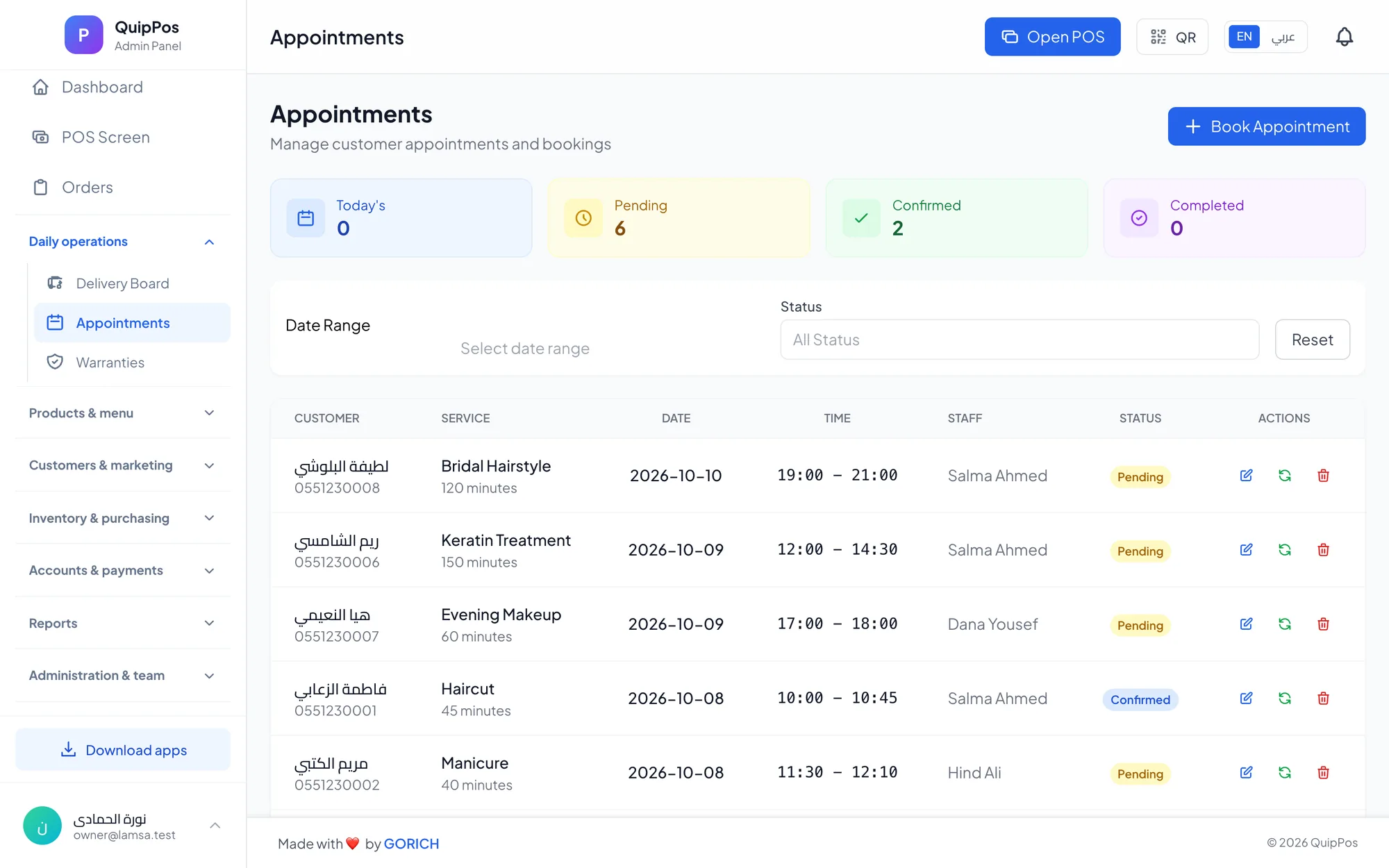
A barbershop POS is point of sale software that handles both walk-ins and booked appointments, records which barber did every cut, calculates each barber's commission as a percentage or a fixed amount, and sells grooming products on the same bill. It replaces the cash box and the notebook, so the owner knows exactly who earned what each day.
Picture a barbershop in Riyadh on a Thursday evening. Five chairs are busy, a queue of walk-ins is waiting, two clients have booked fades with a favourite barber, and a father wants three kids' cuts and a beard trim for himself. Most of the money is cash and changes hands fast. Without a system, the end-of-day count is a guess.
Barbershops run on speed, trust and repeat visits every three to four weeks. This guide explains what a barbershop POS should do, how to set up barber commissions fairly, and how to keep cash and clients under control as you grow from one shop to several.
- Handle walk-ins and appointments in the same daily view, by barber.
- Select the barber on every service at checkout so sales and commissions are credited correctly.
- Choose percentage or fixed commissions per service, and share a report with each barber.
- Open and close every shift with a cash count to catch shortages the same day.
- Use loyalty points and WhatsApp receipts to bring clients back on schedule.
What should a barbershop POS do?
A barbershop has fewer service types than a beauty salon, but more volume, more walk-ins and more cash. The POS has to be quick enough to use between clients and strict enough to protect the till. Before choosing one, check that it covers these basics:
- Fast checkout on a touch screen or tablet, with services in colour-coded categories.
- Appointments per barber and a simple way to add walk-ins to the day.
- The barber on every service, so you know each person's sales.
- Commissions per service, percentage or fixed, calculated automatically.
- Product sales for pomade, beard oil, shampoo and razors, with stock tracking.
- Cash control: shifts with a cash count, refunds with a required reason, and an audit log.
- Loyalty: points, a client history and receipts on WhatsApp.
How to manage walk-ins and appointments together
Most barbershops live on a mix of both. Regulars book their favourite barber, while walk-ins fill the gaps and the busy evenings. The problem is not choosing one model; it is seeing both in one place.
Appointments
Book each appointment against a specific barber and service, such as a skin fade with Omar at 6:30 pm. When a client asks to move it, reschedule in the system instead of rubbing out a line in a diary. Each barber can then see exactly when his next booked client arrives.
Walk-ins
When a walk-in arrives, add him to the schedule of the next free barber. This keeps the day accurate, shows which barber is overloaded, and makes sure the cut is credited to the right person at checkout.
A simple routine for busy nights
- Before opening, check each barber's booked appointments and mark the gaps.
- Offer those gaps to walk-ins first, so booked clients are never kept waiting.
- If one barber is always fully booked, consider giving him longer hours or a higher-priced service.
- After closing, review the day: services per barber, walk-ins versus bookings, and the cash count.
Why sales per barber matter
In many shops, the owner knows the total takings but not who produced them. That makes it impossible to reward the best barbers, coach the slower ones or decide who should open a second chair at a new branch.
When the cashier selects the barber on every service, the POS builds a clear picture over time: how many clients each barber served, which services they sell most and how much revenue they brought in. It also stops a common leak, where a cut is done but never entered because nobody is responsible for it.
Review these numbers every week rather than once a month. A barber who is fully booked but has a low average bill may only need help suggesting a beard trim or a product. A barber who serves many walk-ins but few repeat clients may need coaching on consistency, because regulars come back for a cut they can rely on.
How to set up barber commissions: percentage or fixed?
Barber commissions are usually paid in one of two ways. A percentage commission gives the barber a share of the service price, so it grows when you raise prices or sell premium services. A fixed commission pays the same amount every time a service is done, which is easy to understand and to budget.
| Service (example) | Price | 30% commission | Fixed commission |
|---|---|---|---|
| Haircut | AED 50 | AED 15 | AED 15 |
| Skin fade | AED 70 | AED 21 | AED 18 |
| Beard trim and shape | AED 35 | AED 10.50 | AED 10 |
| Kids' haircut | AED 35 | AED 10.50 | AED 8 |
| Hot towel shave | AED 45 | AED 13.50 | AED 12 |
The figures are examples only. Set prices and rates that fit your area, your costs and the experience of your team.
Which model is fairer?
Percentages suit shops that sell a range of premium services and want barbers to upsell. Fixed amounts suit fast, standard menus where every barber does the same cuts. Because commissions are set per service, you can mix them: a percentage on fades and hot towel shaves, a fixed amount on kids' cuts.
Rules that keep the team happy
- Write the commission rules down and share them before the month starts.
- Agree in advance how refunds and redo cuts affect commissions.
- Let each barber see his own appointments and commissions through a staff portal with a personal PIN.
- Pay from the system's commission report, not from memory or private notebooks.
Selling grooming products from the counter
Pomade, clay, beard oil and aftershave are natural add-ons when a client is looking in the mirror at a fresh cut. They also carry useful margins when they are stocked and displayed well.
- Scan products with any USB or Bluetooth barcode scanner, or generate barcodes for items that have none.
- Use variants for sizes or scents, each with its own price and stock.
- Set low-stock alerts on your best sellers so they are reordered on time.
- Record suppliers and purchase invoices to know your real cost per product.
Product sales go on the same bill as the haircut, so the client pays once and your reports show both service and retail revenue.
How to control cash and close the day without shortages
Barbershops still handle a lot of cash, which makes the end of the day the riskiest moment. A disciplined shift routine prevents most problems.
- Open the shift with a cash count, so the starting float is on record.
- Take mixed payments when needed: part cash, part card on one bill, with the change calculated.
- Require a reason for every refund or void, and limit them to staff with permission.
- Close the shift with a second cash count and review the over/short report.
- Check the audit log weekly to see who did what, and when, for sensitive actions.
Our guide to cash and shift management explains this routine in more detail.
How loyalty brings barbershop clients back every few weeks
A regular who comes every three or four weeks is worth far more over a year than a one-off walk-in. Small rewards keep him coming back to your shop instead of the one next door.
- Save each client's name and phone number at checkout to build his purchase history.
- Give points on every visit that he can redeem as a discount later.
- Use tiers for your most loyal clients, so they feel recognised.
- Send receipts on WhatsApp from your own number; he keeps a record and you keep a direct line.
For more ideas, read our guide to customer loyalty programs.
How Quip POS runs a barbershop
Quip POS supports barbershops through its salon and grooming setup, which includes:
- Appointments per staff member and service, with booking and rescheduling.
- Picking the barber who performed each service at checkout.
- Commissions per service, as a percentage or fixed amount, with a report per staff member.
- A staff portal where each barber signs in with a PIN to see his appointments and commissions.
- Retail products with barcodes, variants, stock, low-stock alerts and suppliers.
- Split and mixed payments, promo codes, per-branch discount limits, shifts with a cash count and an over/short report.
- Loyalty points and tiers, a customer database and WhatsApp receipts from your own number through QuipWhats.
- Roles, permissions, an audit log, and several branches with their own prices and stock plus combined reports.
It runs in any browser, on Windows and Mac, and on iPhone, iPad and Android, in 20 languages, which helps when your barbers speak different first languages. If your shop also serves women or offers spa services, our salon POS system guide covers the wider picture.
Next step: run a test day in your shop
Add your services, barbers and commission rules, then ring up a normal evening of walk-ins and bookings to see how it feels at the chair. Explore a ready shop in the live salon demo, or start a 14-day free trial with every feature and no card; the team can help you set up services and train your barbers.
Frequently asked questions
What is the best POS for a barbershop?
How do barber commissions work?
Should I pay barbers a percentage or a fixed commission?
Can a barbershop POS handle walk-ins without appointments?
How can I stop cash going missing in my barbershop?
Can barbers see their own commissions?
Talk to the Quip POS team
Tell us about your business and we will show you the right setup, help you add your products and connect your printers.
Related articles
Salons & beauty centres
Salon POS System: Appointments, Services and Staff Commissions
What a salon POS system should do: appointments per stylist, services and products on one bill, staff on every sale, automatic commissions and a staff portal with PIN.
 Retail stores
Flower Shop POS for Gift, Chocolate and Bouquet Orders
A flower shop POS should handle bouquets, chocolates, gift bundles, delivery, and deposits without slowing checkout. This guide shows what to set up before busy seasons.
 Restaurants & cafés
Opening a Restaurant: Technology and Operations Checklist
Before you open a restaurant, make sure your menu, printers, kitchen screens, staff roles and payment methods are ready. This checklist helps you test service before day one.