




















Dry Cleaning Software: Pricing, Stain Notes and Order Tracking
A practical guide to dry cleaning software: building a garment price list, inspecting and noting stains per piece, tracking orders to pickup, fast search and unpaid filters.
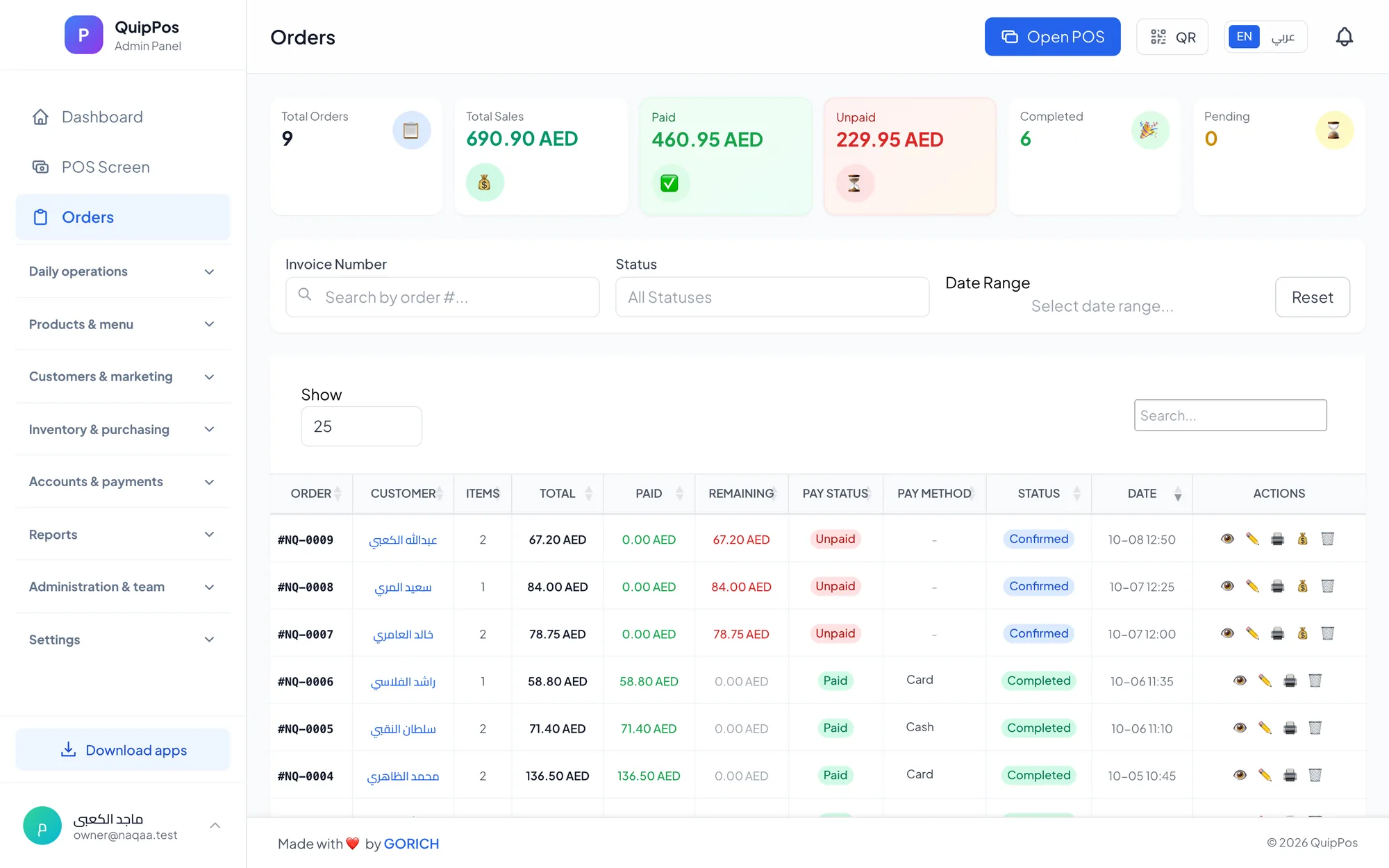
Dry cleaning software is a point of sale and order tracking system for dry cleaners. It stores a price for every garment and service, records stains and care instructions on each piece at the counter, follows each order until pickup, finds any order by phone or order number, and flags unpaid balances so nothing leaves the shop unpaid.
Picture a dry cleaner in Jeddah the week before Eid. In one hour the counter receives a beaded evening abaya, a wedding guest's silk dress, a bisht, three business suits and a pile of shirts from a regular customer who never keeps his tickets. Each piece needs a price, a careful inspection and a promise about when it will be ready.
The same pressure exists for a high-street cleaner in London or a hotel-district shop in Dubai. Dry cleaning is a trust business: customers hand over their most expensive clothes. This guide shows how to build a clear price list, inspect and note every garment, track orders, and get paid in full, with practical routines you can start this week.
- Build your price list per garment and per service, with a photo for each item type.
- Inspect every piece at the counter and write the stain or instruction on that piece.
- Give every order a status and a pickup date, and review both daily.
- Search by phone, name or order number when a customer has lost the ticket.
- Use the unpaid filter weekly so no balance is forgotten.
What does dry cleaning software do?
At its core, dry cleaning software manages the life of an order from the moment a garment crosses the counter to the moment it goes home. A complete system covers:
- Pricing: a price per piece for each service, so every staff member charges the same.
- Order entry: tapping item photos to add pieces quickly, even during a rush.
- Garment notes: stains, damage and special instructions recorded on each piece.
- Status tracking: received, in progress, ready for pickup and picked up, with a pickup date.
- Search: finding open orders by order number, customer name or phone.
- Payments: paying in full, in part or on pickup, with filters for unpaid orders.
- Customers: a history of orders and balances, loyalty points and receipts on WhatsApp.
If you also offer everyday wash and iron services, our laundry POS system guide covers the high-volume side of the counter.
How to build a dry cleaning price list
A good price list is short enough to use at speed and detailed enough to reflect real work. The simplest structure is one item per garment type, each with a price for every service you offer, such as dry clean, iron only, or wash and iron.
| Garment group | Examples | Pricing tip |
|---|---|---|
| Everyday | Shirts, trousers, kanduras | Low price, high volume |
| Formal | Suits, blazers, bisht | Price per piece, not per set |
| Delicate | Silk, beaded abayas, evening dresses | Separate premium items |
| Household | Curtains, duvets, blankets | Price by size, such as single or double |
| Special occasion | Wedding dresses, embroidered pieces | Own item with a higher price |
Pricing mistakes to avoid
- One price for every dress. A cotton dress and a beaded gown take very different time and risk. Create separate items.
- Suits as one item only. Customers often bring a jacket without the trousers. Price each piece so partial sets are easy.
- Free-typed prices at the counter. They create inconsistency between staff and branches. Keep prices in the system.
- Prices that never change. Review your list every few months against your sales report and the time each item really takes.
Add a clear photo to each item type and name it in the two languages your customers read, such as Arabic and English. New staff learn the counter faster when they can recognise a garment by its picture.
How to inspect garments and record stains at the counter
The counter inspection is the most valuable two minutes in dry cleaning. It protects the garment, guides the cleaner and protects you if a question comes up at pickup.
- Empty the pockets with the customer present, and hand back anything you find.
- Read the care label. If it is missing or says do not dry clean, note it and agree how to proceed.
- Check for stains in good light, especially collars, cuffs, underarms and the front of trousers.
- Ask what caused the stain and when; oil, coffee, ink and perfume each need a different treatment.
- Check fragile details such as beads, sequins, buttons and embroidery, and note anything loose or missing.
- Write a note on that piece in the system, not on a separate paper, so it travels with the order.
- Confirm the notes with the customer before they leave.
What a useful note looks like
Short, specific and factual. For example: “oil stain, right cuff, customer says two weeks old”, “two beads missing on left sleeve before cleaning”, “no crease on trousers”, or “press only, do not steam”. Vague notes like “dirty” or “check” help nobody.
When every special instruction lives on the piece itself, the cleaner and the presser follow the same information, and you can show what was recorded when the garment arrived.
How to track dry cleaning orders from counter to rail
Every order should carry a status and a pickup date from the moment it is received. Together they tell the team what to do next and tell the customer when to come back.
- Received: inspected, priced and noted.
- In progress: at the cleaning or pressing stage.
- Ready for pickup: finished, bagged and on the rail.
- Picked up: collected and fully paid.
Organise your rail by order number so a ready order can be found as fast as the system finds it. Each morning, review orders due today that are not yet ready. Each evening, review ready orders that were not collected, and message those customers on WhatsApp from your own number.
How to find an order by phone or order number
Customers lose tickets, send a driver, or call to ask whether a suit is ready. In each case, the counter needs an answer in seconds, not a search through bags.
- Search open orders by order number when the customer has the receipt.
- Search by phone number when they do not; it is the one detail almost everyone remembers.
- Search by customer name for regulars you know well.
- Filter by status to answer “is it ready?” without leaving the counter.
Fast search also reduces mistakes at pickup. Confirm the customer's name and phone against the order before handing over expensive garments.
How to get paid: deposits, balances and the unpaid filter
Dry cleaners use different payment policies. Some ask for full payment at drop-off, some take a deposit, and some collect everything on pickup. Any of these works, as long as the balance is recorded on the order.
- Record whatever the customer pays at drop-off, in full or in part.
- Accept cash, card or bank transfer, or a mix on one bill, with change calculated.
- Collect the remaining balance at pickup, before marking the order as picked up.
- Use the unpaid filter every week to see every open balance in one list.
- Close each shift with a cash count and review the over/short report.
Refunds and voids should require a reason and the right permission, and sensitive actions should appear in an audit log. Our guide to cash and shift management explains a clean end-of-day routine.
How to keep regular dry cleaning customers coming back
Business clients, families and professionals who wear suits every day are the backbone of a dry cleaner. Keep them close with a few simple habits:
- Save every customer with name, phone and address, so their order history and balance are always visible.
- Reward repeat visits with loyalty points they can redeem as a discount.
- Send receipts on WhatsApp, and a short message when a large order is ready.
- Ask before sending offers, and keep promotional messages rare and relevant.
For ideas on rewards and tiers, read our customer loyalty program guide.
How Quip POS works for dry cleaners
Quip POS includes a laundry and dry cleaning setup designed around the counter workflow above:
- Items with photos and per-piece prices per service, such as wash, iron and dry clean.
- Notes per piece for stains and special instructions.
- Order status (received, in progress, ready for pickup, picked up) with the pickup date.
- Search open orders by number, customer name or phone, with filters for status and unpaid.
- Balance collection on pickup, split and mixed payments, and shifts with a cash count and over/short report.
- Customers: a database with history, addresses and balances, loyalty points, and WhatsApp receipts and messages from your own number through QuipWhats.
- Control: roles and permissions, refunds with a required reason, an audit log, reports, and several branches with their own prices.
It runs in any browser, in desktop apps for Windows and Mac that keep selling and printing offline, and on iPhone, iPad and Android, in 20 languages with two content languages for item names and receipts. See every module on the features page.
Next step: test it with your own garments
Enter part of your price list, receive a few real garments with notes, move them through each status and collect a balance at pickup. You will know within a day whether the counter feels faster and safer. Try a ready company in the live laundry demo, or start a 14-day free trial with every feature and no card; the team can help you set up your items and connect your printer.
Frequently asked questions
What is the best dry cleaning software for a small shop?
How do dry cleaners keep track of garments?
How should a dry cleaner record stains and damage?
How do I set dry cleaning prices?
Can dry cleaning software find an order without the ticket?
How do dry cleaners handle unpaid balances?
Talk to the Quip POS team
Tell us about your business and we will show you the right setup, help you add your products and connect your printers.
Related articles
Laundries
Laundry POS System: Track Every Piece From Drop-off to Pickup
How a laundry POS system works: per-piece prices for wash, iron and dry clean, order status from received to picked up, notes per piece, fast search and unpaid balances.
 Retail stores
Flower Shop POS for Gift, Chocolate and Bouquet Orders
A flower shop POS should handle bouquets, chocolates, gift bundles, delivery, and deposits without slowing checkout. This guide shows what to set up before busy seasons.
 Restaurants & cafés
Opening a Restaurant: Technology and Operations Checklist
Before you open a restaurant, make sure your menu, printers, kitchen screens, staff roles and payment methods are ready. This checklist helps you test service before day one.